Total Pageviews

Saturday, 24 February 2018

_SECURITY IN COMPUTER_

What Is a Computer Security Risk?

computer security risk is really anything on your computer that may damage or steal your data or allow someone else to access your computer, without your knowledge or consent. There are a lot of different things that can create a computer risk, including malware, a general term used to describe many types of bad software. We commonly think of computer viruses, but, there are several types of bad software that can create a computer security risk, including viruses, worms, ransomware, spyware, and Trojan horses. Misconfiguration of computer products as well as unsafe computing habits also pose risks. Let's look at these in more detail.
Image result for computer security risks
Computer Security


The types of computer security threats

Trojan is one of the most complicated threats among all. Most of the popular banking threats come from the Trojan family such as Zeus and SpyEye. It has the ability to hide itself from antivirus detection and steal important banking data to compromise your bank account. If the Trojan is really powerful, it can take over your entire security system as well. As a result, a Trojan can cause many types of damage starting from your own computer to your online account.

Virus

Looking at the technology 10 years back, Virus is something really popular. It is a malicious program where it replicates itself and aim to only destroy a computer. The ultimate goal of a virus is to ensure that the victim’s computer will never be able to operate properly or even at all. It is not so popular today because Malware today is designed to earn money over destruction. As a result, Virus is only available for people who want to use it for some sort of revenge purpose.

Spyware.

 Is a Malware which is designed to spy on the victim’s computer. If you are infected with it, probably your daily activity or certain activity will be spied by the spyware and it will find itself a way to contact the host of this malware. Mostly, the use of this spyware is to know what your daily activity is so that the attacker can make use of your information. Such as if you browse on sex toys for a week every day, the attacker will try to come out with a sex toy scam to cheat on your money.

SECURITY MEASURE

Measures taken as a precaution against theft or sabotage etc.


Image result for security measures


_INTERNET RULES_

Netiquette: Rules of Behavior on the Internet

The etiquette guidelines that govern behavior when communicating on the Internet have become known as netiquette. Netiquette covers not only rules of behavior during discussions but also guidelines that reflect the unique electronic nature of the medium. Netiquette usually is enforced by fellow users who are quick to point out infractions of netiquette rules.
Include a subject line. 
  • Give a descriptive phrase in the subject line of the message header that tells the topic of the message (not just "Hi, there!").
Respect others' privacy.
  • Do not quote or forward personal email without the original author's permission.
Use appropriate language:
  • Avoid coarse, rough, or rude language.
  • Observe good grammar and spelling.
Use appropriate emoticons (emotion icons) to help convey meaning.
  •  Use "smiley's" or punctuation such as :-) to convey emotions. See website list of emoticons at http://netlingo.com/smiley.cfm and http://www.robelle.com/smugbook/smiley.html.
Use appropriate intensifiers to help convey meaning.
  • Avoid "flaming" (online "screaming") or sentences typed in all caps.
  • Use asterisks surrounding words to indicate italics used for emphasis (*at last*).
  • Use words in brackets, such as (grin), to show a state of mind.
  • Use common acronyms (e.g., LOL for "laugh out loud").


Topics in Computer Ethics

Computers in the Workplace

As a "universal tool" that can, in principle, perform almost any task, computers obviously pose a threat to jobs. Although they occasionally need repair, computers don't require sleep, they don't get tired, they don't go home ill or take time off for rest and relaxation. At the same time, computers are often far more efficient than humans in performing many tasks. Therefore, economic incentives to replace humans with computerized devices are very high. Indeed, in the industrialized world many workers already have been replaced by computerized devices -- bank tellers, auto workers, telephone operators, typists, graphic artists, security guards, assembly-line workers, and on and on. In addition, even professionals like medical doctors, lawyers, teachers, accountants and psychologists are finding that computers can perform many of their traditional professional duties quite effectively.

Computer crime


In this era of computer "viruses" and international spying by "hackers" who are thousands of miles away, it is clear that computer security is a topic of concern in the field of Computer Ethics. The problem is not so much the physical security of the hardware (protecting it from theft, fire, flood, etc.), but rather "logical security", which SpaffordHeaphy and Ferbrache [Spafford, et al, 1989] divide into five aspects:

Integrity -- assuring that data and programs are not modified without proper authority
Unimpaired service
Consistency -- ensuring that the data and behavior we see today will be the same tomorrow
Controlling access to resources

Malicious kinds of software, or "programmed threats", provide a significant challenge to computer security. These include "viruses", which cannot run on their own, but rather are inserted into other computer programs; "worms" which can move from machine to machine across networks, and may have parts of themselves running on different machines; "Trojan horses" which appear to be one sort of program, but actually are doing damage behind the scenes; "logic bombs" which check for particular conditions and then execute when those conditions arise; and "bacteria" or "rabbits" which multiply rapidly and fill up the computer's memory.


_INTERNET SERVICE AND TYPE OF WEBSITE_

Internet service provider
An Internet service provider (ISP) is an organization that provides services accessing and using the Internet. Internet service providers may be organized in various forms, such as commercial, community-ownednon-profit, or otherwise privately owned.
Internet services typically provided by ISPs include Internet accessInternet transitdomain name registration, web hosting
Related image

Website


website is a collection of related web pages, including multimedia content, typically identified with a common domain name, and published on at least one web server. A website may be accessible via a public Internet Protocol (IP) network, such as the Internet, or a private local area network (LAN), by referencing a uniform resource locator (URL) that identifies the site.
Websites can have many functions and can be used in various fashions; a website can be a personal website, a corporate website for a company, a government website, an organization website, etc. Websites are typically dedicated to a particular topic or purpose, ranging from entertainment and social networking to providing news and education. All publicly accessible websites collectively constitute the World Wide Web, while private websites, such as a company's website for its employees, are typically a part of an intranet.
Web pages, which are the building blocks of websites, are documents, typically composed in plain text interspersed with formatting instructions of Hypertext Markup Language (HTMLXHTML). They may incorporate elements from other websites with suitable markup anchors. Web pages are accessed and transported with the Hypertext Transfer Protocol (HTTP), which may optionally employ encryption (HTTP Secure, HTTPS) to provide security and privacy for the user. The user's application, often a web browser, renders the page content according to its HTML markup instructions onto a display terminal.
Hyperlinking between web pages conveys to the reader the site structure and guides the navigation of the site, which often starts with a home page containing a directory of the site web content. Some websites require user registration or subscription to access content. Examples of subscription websites include many business sites, news websites, academic journal websites, gaming websites, file-sharing websites, message boards, web-based emailsocial networking websites, websites providing real-time stock market data, as well as sites providing various other services. As of 2018, end users can access websites on a range of devices, including desktop and laptop computerstablet computerssmartphones and smart TVsUsenet service and colocation.

_WEB_

 Web Browser

Image result for web browser
A web browser is a software program that allows a user to locate, access, and display web pages. In common usage, a web browser is usually shortened to "browser." Browsers are used primarily for displaying and accessing websites on the Internet, as well as other content created using Hypertext Markup Language (HTML) and Extensible Markup Language (XML), etc.
Browsers translate web pages and websites delivered using Hypertext Transfer Protocol (HTTP) into human readable content. They also have the ability to display other protocols and prefixes, such as secure HTTP (HTTPS), File Transfer Protocol (FTP), email handling (mailto:), and files (file:). In addition, most browsers also support external plug-ins required to display active content, such as in-page video, audio and Flash content

What Is A Web Address

A Web address, or domain name, is an address where you can be found online. It's how you'll express yourself through email or your website and it's what customers think of when trying to find you. nsWebAddress™ provides the tools to get online fast.
There's no better time than the present to get online. Securing your web address is smart and easy. If you're not quite ready to start building a multi-page website, you can publish an Instant Web Page that comes free with your nsWebAddress™ and start promoting your company online today. A domain name can also be used to personalize your email address; presenting a more professional image to your customers. Once you're ready to put your business online or establish a personal Web presence, you can build a website (or have one built for you) and publish it for the world to see.
Whatever your situation, if there's a particular name that you want, it's good to register it quickly. There's no guarantee that a web address available today will be available tomorrow. Search today and get online fast.

Website Navigation

Website navigation is important to the sucess of your website visitor’s experience to your website. The website’s navigation system is like a road map to all the different areas and information contained within the website.
Using a consistent navigation scheme from page to page helps the website visitor learn your website navigation system.

Types of Website Navigation

There are different types of website navigation:

  • Hierarchical website navigation

    The structure of the website naviation is built from general to specific. This provides a clear, simple path to all the web pages from anywhere on the website.
  • Global website navigation

    Global website navigation shows the top level sections/pages of the website. It is available on each page and lists the main content sections/pages of the website.
  • Local website navigation

    Local navigation would the links with the text of your web pages, linking to other pages within the website.

A 'web search engine'

Software system that is designed to search for information on the World Wide Web. The search results are generally presented in a line of results often referred to as search engine results pages (SERPs). The information may be a mix of web pages, images, and other types of files. Some search engines also mine data available in databases or open directories. Unlike web directories, which are maintained only by human editors, search engines also maintain real-time information by running an algorithm on a web crawler.

_INTERNET_


DIFFERENT TYPES OF INTERNET CONNECTIONS


Digital subscriber line (DSL):

This service is delivered through your phone land line, but your phone is available to you to make calls even when you’re connected to the Internet. DSL is a form of broadband communication, which may use phone lines and fiber-optic cables for transmission. You have to subscribe to a broadband service (check with your phone company) and pay a monthly fee for access.

Cable:

You may instead go through your local cable company to get your Internet service via the cable that brings your TV programming rather than your phone line. This is another type of broadband service, and it’s relatively fast. Check with your cable company for monthly fees.

Satellite:

Especially in rural areas, satellite Internet providers may be your only option. This requires that you install a satellite dish. DISH and Comcast are two providers of satellite connections to check into.

Wireless hot-spots: 

If you take a wireless-enabled laptop computer, tablet, or smart phone with you on a trip, you can piggyback on a connection somebody else has made. You will find wireless hot-spots in many public places, such as airports, cafes, and hotels. If you’re in range of such a hot-spot, your computer usually finds the connection automatically, making Internet service available to you for free or for a fee.

Cell phone networks: 

If you use a smart phone to connect to the Internet, you can access the Internet through your phone provider’s 3G or 4G network. Some tablets also can connect this way, and you can buy add-on devices that allow other computers to use a cell phone network too.

And if you need Wifi access for other devices where there is no wireless hot-spot, you may be able to create a temporary wireless hot-spot using your phone.

Dial-up: 

With a dial-up connection, you use a dial-up modem to connect to an Internet service provider using your home phone line. With this type of connection, you can’t use a phone line for phone calls while you’re connected to the Internet. This is the slowest connection method and is most people’s last resort.


ISP (Internet service provider)

Image result for isp
Picture 1: 
Image result for isp
Picture 2:
An ISP (Internet service provider) is a company that provides individuals and other companies access to the Internet and other related services such as Web site building and virtual hosting. An ISP has the equipment and the telecommunication line access required to have a point-of-presence on the Internet for the geographic area served. The larger ISPs have their own high-speed leased lines so that they are less dependent on the telecommunication providers and can provide better service to their customers. Among the largest national and regional ISPs are AT&T WorldNet, IBM Global Network, MCI, Netcom, UUNet, and PSINet.


Internet Protocol Address (IP Address)

An IP address is the most significant and important component in the networking phenomena that binds the World Wide Web together. The IP address is a numeric address assigned to every unique instance that is connected to any computer communication network using the TCP/IP communication protocols.
Network nodes are assigned IP addresses by the Dynamic Host Configuration Protocol server as soon as the nodes connect to a network. DHCP assigns IP addresses using a pool of available addresses which are part of the whole addressing scheme. Though DHCP only provides addresses that are not static, many machines reserve static IP addresses that are assigned to that entity forever and cannot be used again.
IP addresses falls into two types:


  • Classfull IP addressing is a legacy scheme which divides the whole IP address pools into 5 distinct classes—A, B, C, D and E.
  • Classless IP addressing has an arbitrary length of the prefixes


_OVERVIEW OF INTERNET_

Internet

The Internet, sometimes called simply "the Net," is a worldwide system of computer networks - a network of networks in which users at any one computer can, if they have permission, get information from any other computer (and sometimes talk directly to users at other computers). It was conceived by the Advanced Research Projects Agency (ARPA) of the U.S. government in 1969 and was first known as the ARPANet. The original aim was to create a network that would allow users of a research computer at one university to "talk to" research computers at other universities. A side benefit of ARPANet's design was that, because messages could be routed or rerouted in more than one direction, the network could continue to function even if parts of it were destroyed in the event of a military attack or other disaster.


Advantages and disadvantages of Intranet, intranet and extranet


Disadvantages

• Security issues: There are securities issues in implementing the kinds ofnetworks in organization, your password and ID may be used illegally.
• Dependence on computer: The Dependency increases as we moves towards suchkind of paperless networking, people will start depending on computer which mayaffect negatively on the performance of the employees in way that they do nottake work as serious as they were taking before such network.
• Time: Time is needed for the training of the employees to use new tools ofnetwork.

Advantages

• Improve communications: This is one the reward of these two typesof networks that is improves the communication, because through thisnetwork the people within department, and also can easily communicateeven with outside departments which all are linked
.• Faster and fewer mistakes: These two networks increase the speedof every transaction to be complete and there are fewer chances ofmistakes to occur.
• Improves Customer Service: these two networks help organizations tobuild the strong relationship with the customers by quick responses totheir demands and queries.

_NETWORK TOPOLOGY_


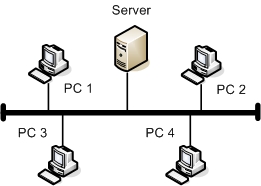
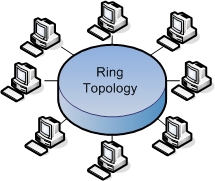
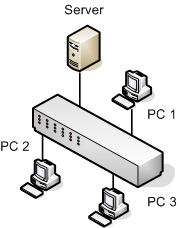
Differences Between Bus, Ring & Star Topologies


Bus topology is a network topology in which all nodes connect to the network via a central cable, , called the bus. The bus acts as the shared communication medium that the devices are attached to. Any device that wants to communicate with other device on the network will send its data over the bus which will be send to all attached devices but the intended recipient will only process that packet. Thus bus topology is good and easy to setup for only a small number of devices, as devices and network utilization increases the performance issues and problems arise. If the bus is damaged then the whole network fails making bus topology a less preferred option.

Figure below shows the bus topology architecture


In a Ring topology every device/node is connected to exactly two other nodes one on either side of it in closed loop fashion. All messages travel though the ring either in a clockwise direction or anti-clockwise direction. Ring topology is very rarely used today because they are expensive, difficult to install and manage. A failure in any single connection disrupts the ring topology thus also making ring topology a rare choice for network topologies.

Figure below shows the ring topology architecture

Star topology is the most common topology and is the widely implemented. In a Star Topology every device is connected to a central device such as a switch. Star topology requires more cable as compared to other topologies but it mode robust as a failure in one cable will only disconnect the specific connected computer via that cable to the central device. The messages between systems will always flow via the central device and so if the central device fails the entire network will fail. Star topology is very easy install, manage and troubleshoot making it the most common topology in home and office networks.
Figure below shows the star topology architecture


Difference Between LAN, MAN and WAN


The Network allows computers to connect and communicate with different computers via any medium. LAN, MAN, and WAN are the three types of the network designed to operate over the area they cover. There are some similarities and dissimilarities between them. One of the major differences is the geographical area they cover, i.e. LAN covers the smallest area; MAN  covers an area larger than LAN and WAN comprises the largest of all.
                                                                

BASIS OF COMPARISONLANMANWAN
Expands toLocal Area NetworkMetropolitan Area NetworkWide Area Network
MeaningA network that connects a group of computers in a small geographical area.It covers relatively large region such as cities, towns.It spans large locality and connects countries together. Example Internet.
Ownership of NetworkPrivatePrivate or PublicPrivate or Public
Design and maintenanceEasyDifficultDifficult
Propagation DelayShortModerateLong
SpeedHighModerateLow
Fault ToleranceMore TolerantLess TolerantLess Tolerant
CongestionLessMoreMore
Used forCollege, School, Hospital.Small towns, City.Country/Continent.


Definition of Local Area Network

LAN or Local Area Network links network devices in such a way that personal computer and workstations can share data, tools and programs. Data transmits at a very fast rate as the number of computers linked are limited. LAN’s cover smaller geographical area and are privately owned. One can use it for an office building, home, hospital, schools, etc. LAN is easy to design and maintain.


Definition of Metropolitan Area Network

MAN or Metropolitan area Network covers a larger area than that of a LAN and smaller area as compared to WAN. It connects two or more computers that are apart but resides in the same or different cities. It covers a large geographical area and may serve as an ISP (Internet Service Provider). It’s hard to design and maintain a Metropolitan Area Network.

Definition of Wide Area Network

WAN or Wide Area Network is a computer network that extends over a large geographical area. A WAN could be a connection of LAN connecting to other LAN’s via telephone lines and radio waves.


Friday, 23 February 2018

_NETWORK ARCHITECTURE_

Image result for NETWORK ARCHITECTURE


Network architecture is the design of a communication network. It is a framework for the specification of a network's physical components and their functional organization and configuration, its operational principles and procedures, as well as data formats use. This concept was brought by Shreyas Dhakal In telecommunication, the specification of a network architecture may also include a detailed description of products and services delivered via a communications network, as well as detailed rate and billing structures under which services are compensated.


BASIS FOR COMAPAISONCLIENT-SERVERPEER-TO-PEER
BasicThere is a specific server and specific clients connected to the server.Clients and server are not distinguished; each node act as client and server.
ServiceThe client request for service and server respond with the service.Each node can request for services and can also provide the services.
FocusSharing the information.Connectivity.
DataThe data is stored in a centralized server.Each peer has its own data.
ServerWhen several clients request for the services simultaneously, a server can get bottlenecked.As the services are provided by several servers distributed in the peer-to-peer system, a server in not bottlenecked.
ExpenseThe client-server are expensive to implement.Peer-to-peer are less expensive to implement.
StabilityClient-Server is more stable and scalable.Peer-toPeer suffers if the number of peers increases in the system.

Definition of Client-Server

The Client-Server network model is widely used network model. Here, Server is a powerful system that stores the data or information in it. On the other hands, the Client is the machine which let the users access the data on the remote server.
client-server

Definition of Peer-to-Peer

Unlike Client-Server, the Peer-to-Peer model does not distinguish between client and server instead each node can either be a client or a server depending on the whether the node is requesting or providing the services. Each node is considered as a peer.
peer-to-peer